
先贴图为证
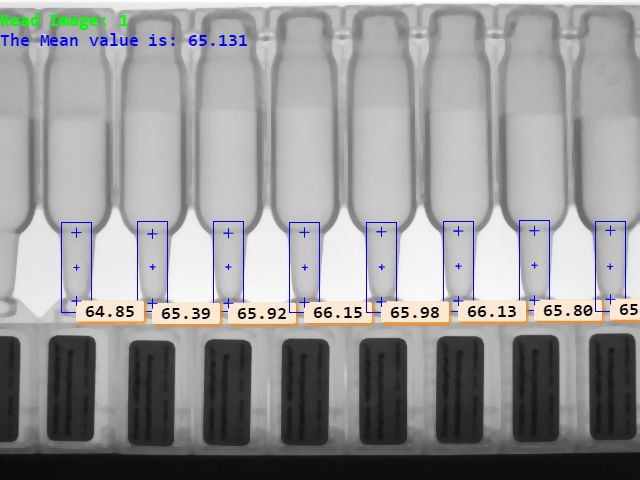
在工业应用领域,距离测量的应用也是比较多的。
举个例子,在瓶装检测中,由于某些异常操作,导致瓶中的液体装不满,这样的产品是不能流入市场的。
半瓶水的液体先不说我买不买,就是买回来也不敢喝。
因此,在产品出厂或入库之前,必须经过检测这一关。
今天,我们就充当检测员,看看这些东西是怎么检测的吧!
如果你手边有Halcon软件,自己跑跑程序;如何你没有,呵呵,问我要啊!这个软件还需要许可证,呵呵,问我要啊!可惜了,族规有要求,传女不传男!我也没办法啊!
废话不多说,开始!Go! Go! Go!
注意注意,这次我不检测瓶中液体高度,我要检测瓶口高度。如下图
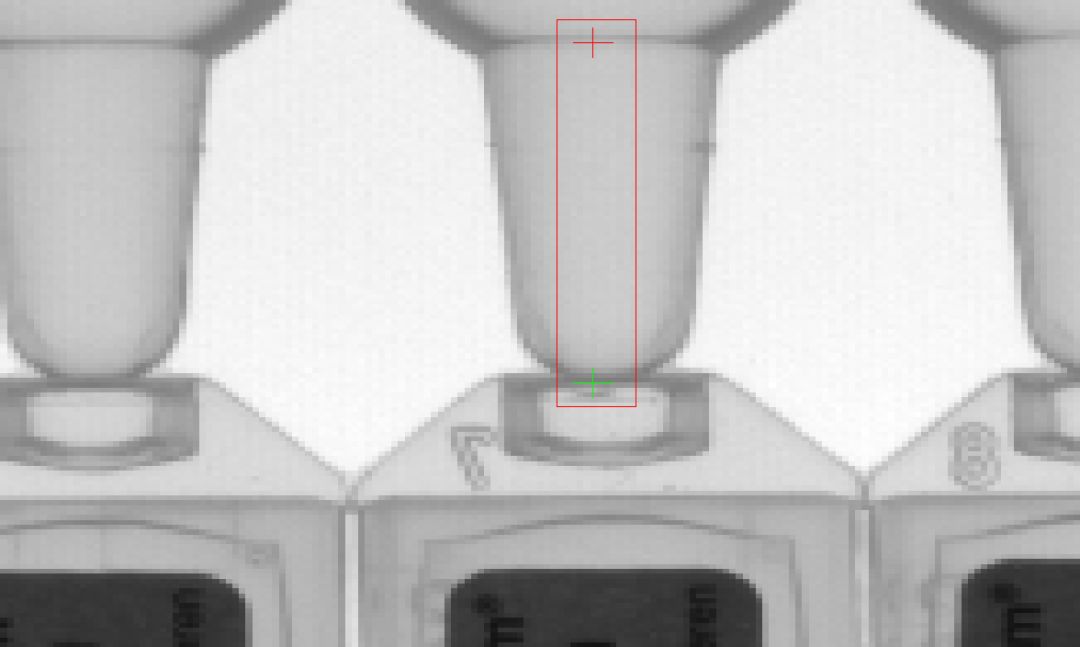
我要检测这部分的高度!!!
为什么???
因为族规有要求,不测寻常路!!!我也没办法!
产品拿到手,第一步,分析产品特点。我们看看上图,你说你要怎么检测红线框内的高度,那模模糊糊的是啥!而且,这图中还有那么多瓶子,咋检?再瞅瞅,框内的瓶与框外的都是灰色的,颜色都是差不多,你说咋检?
这位兄台,莫着急!慢慢听来!
一幅图中有多个待检测对象——需要模板匹配!
因为你也不知道它会在哪,只能,不敢打包票,最好使用模板匹配的方法找到它们的位置。
2. 假如说我们找到了匹配的位置,然后应该怎么做呢?
找到了位置,我们就直接进行检测!
怎么检测,在Halcon中,我们可以先创建个测量对象,然后基于此对象ID所包含的区域中可自动检测垂直于长边的短边距离!
咳咳,说的有点装*了,说白了,就是你在图中画个矩形,Halcon中的有个函数会直接帮你计算出来距离。
如果你仔细一点,我会告诉你计算的是短距离,如下图。
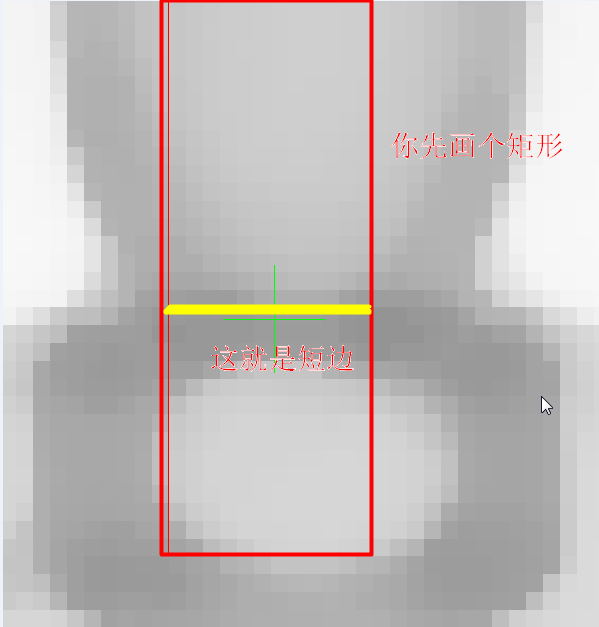
这下子你就明白了吧!
它测的就是短边的距离!
原来,测量距离超级简单啊,画个矩形就可以了!!!
有了上面的分析,我们的思路,或者说我的思路就很明确了啊!先创建了模板,然后模板匹配,然后在匹配到的对象中测量距离!
So easy !!!
注意,注意,我要放大招了!
我要狠心地贴出程序了!
想运行看看的,赶紧走起!!!
如果你看了程序,觉得哪里有疑问的,别害羞,要留言。
如果你觉得程序还可以,你想报答我,点最下面的广告!
* This program is to measure the distance between the top of the bottleneck and * the bottom of the bottoleneck* The ideas to achieve this is * First, Create shape model based on the bottleneck shape to locate the bottle* Second, Measure the distance based on the measure object.
* Date: 2018-03-27
* Read Imageread_image (Image, 'C:/Users/Public/Documents/MVTec/HALCON-12.0/examples/images/ampoules/ampoules_01.png')get_image_size (Image, Width, Height)dev_close_window ()dev_open_window (0, 0, Width, Height, 'black', WindowHandle)dev_display (Image)set_draw (WindowHandle, 'margin')* create the reduce domain by rectanglegen_rectangle1 (ROI_0, 236, 206, 296, 250)reduce_domain (Image, ROI_0, ImageReduced)* area centerarea_center (ROI_0, Area, RowRef, ColumnRef)* create shape modelcreate_shape_model (ImageReduced, 'auto', 0, 0, 'auto', 'auto', 'use_polarity', 'auto', 'auto', ModelID)* define the length and width of the measure rectangle objectROI_width := 15ROI_height:= 45* show the rectangle gen_rectangle2 (ROI_1, 253, 459, rad(-90), ROI_height, ROI_width)* create the rectangle measure objectgen_measure_rectangle2 (0, 0, rad(90), ROI_height, ROI_width, Width, Height, 'bilinear', MeasureHandle)* set fontsset_display_font (WindowHandle, 16, 'mono', 'true', 'false')
for I:=1 to 8 by 1 * read images read_image (Image1, 'C:/Users/Public/Documents/MVTec/HALCON-12.0/examples/images/ampoules/ampoules_'+ I$'02d') * find shape. The MinScore is very important. If larger, more noise will be. find_shape_model (Image1, ModelID, 0, 0, 0.90, 0, 0.5, 'least_squares', 0, 0.9, Row, Column, Angle, Score)
* Mulity Shape found for J:=0 to |Score| -1 by 1 if(|Score[J]|==1) * set the cross at the center found gen_cross_contour_xld (Cross1, Row[J], Column[J], 6, 0) translate_measure (MeasureHandle, Row[J]-5, Column[J]) gen_rectangle2 (ROI_2, Row[J], Column[J], rad(-90), ROI_height, ROI_width) * Measure the edge * The Sigma and threshold are very important. measure_pairs (Image1, MeasureHandle, 1.2, 10, 'all', 'all', RowEdgeFirst, ColumnEdgeFirst, AmplitudeFirst, RowEdgeSecond, ColumnEdgeSecond, AmplitudeSecond, IntraDistance, InterDistance)
if(|RowEdgeFirst|!=0) disp_message (WindowHandle, InterDistance$'.2f', 'window', RowEdgeFirst[0], ColumnEdgeFirst[0], 'black', 'true') else disp_message (WindowHandle, 'None Found', 'window', 20, 0, 'black', 'true') endif * Show it for edge:=0 to |RowEdgeFirst|- 1 by 1 gen_cross_contour_xld (Cross, RowEdgeFirst[edge], ColumnEdgeFirst[edge], 10, 0) endfor endif endfor
stop () endforclear_shape_model (ModelID)close_measure (MeasureHandle)
一幅图中有多个待检测对象——需要模板匹配!